 Reachloom
Earn the mention.
Win the link.
Reachloom finds pages that fit your product, writes to the people behind them, and follows every reply, so a yes becomes a link.
Find pages that fit your product.
Reachloom searches the web, opens each page to make sure it is real, and keeps the ones that fit. You get a list of pages, with the people behind them.
Learn moreFrom your product page
to a link on theirs.
Describe your product. Find pages that fit, write to the people behind them, and follow the replies until a link appears.
Start for freeEmails you would be happy to send
Each email starts from the page: what it covers, why your product fits, and one clear ask. It sounds like you, because it uses your product profile and your brief.
Learn moreYou control how emails go out
Emails go out from the email account you connect and are signed with your name, so replies come straight to you.
Learn moreA flow you can read at a glance
The flow is fixed, so nothing surprising hides in it. Click any step to change its settings.
Learn moreConversations, not a mailbox to babysit
Drafts, sent emails, replies, wins, and archive in one place. Filter by campaign when you want to focus.
Learn moreResults you can check
Pages you emailed are checked every few days for up to 90 days. When your link appears, the conversation is marked won with the live address.
Learn moreSee every campaign
in one workspace.
Read the pages, drafts, and replies side by side, and decide what goes out.
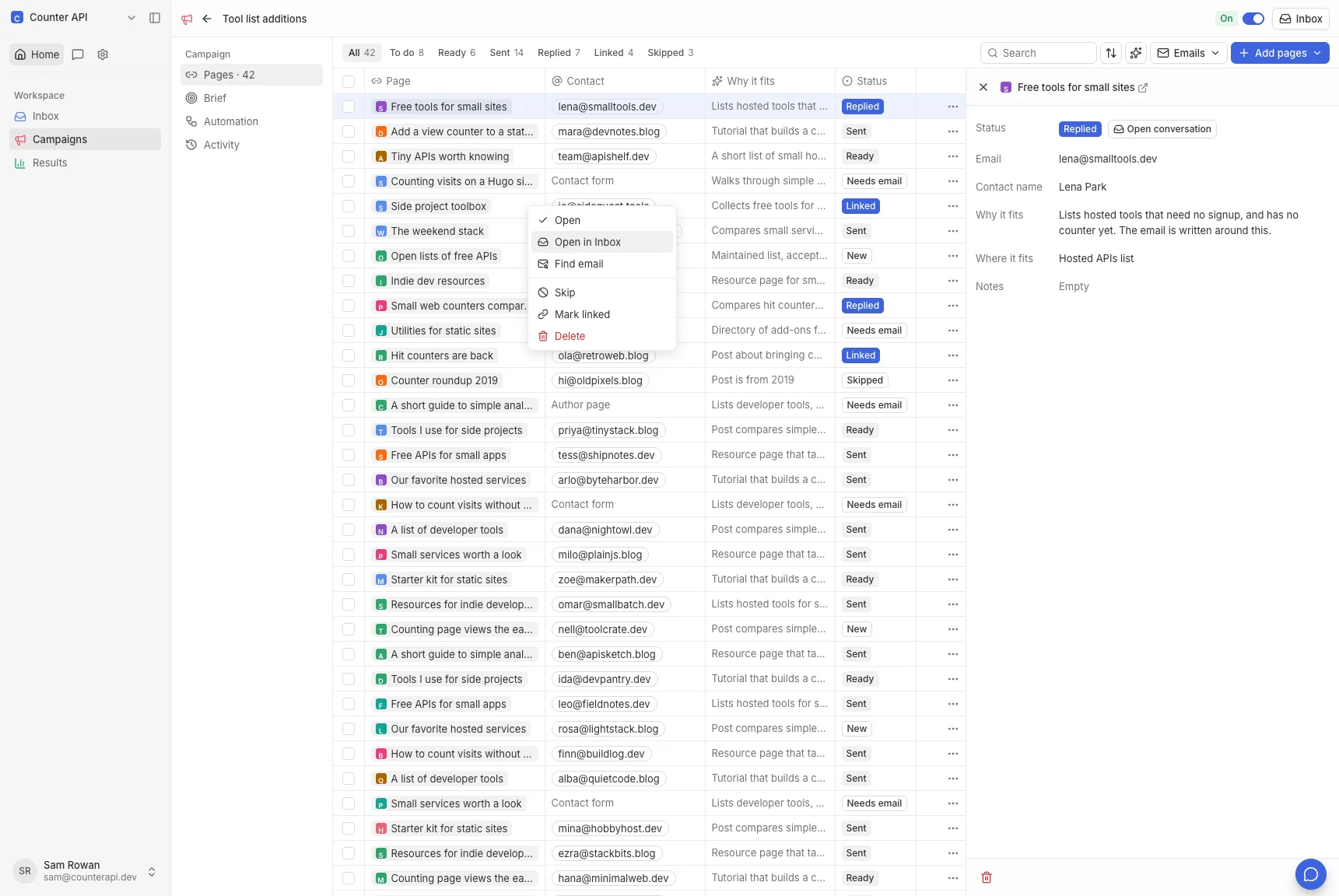
The tools for your
next campaign.
Find pages, write emails, send, follow the replies, and check for links in one workspace.
Your mailbox, your limits
Reachloom sends from the email account you connect, inside a daily limit and your sending hours. It reads only the conversations that began with an email it sent.
Protections that stay on
Opt-outs, the do-not-contact list, one first email per address, and the draft check always apply. They are not settings.
Prepare outreach
with your AI agent.
Use Claude, Cursor, or another compatible MCP client to read your campaigns, find pages, and write drafts. You keep the sending.
Explore Reachloom MCP
Bring your tech stack
together
Send from your own email, get alerts where you work, and connect your AI tools through MCP.
View all integrations
Gmail, Outlook, and SMTP
Send from your own address, inside your limits. Sign in with Google or Microsoft, or use any mailbox with SMTP and IMAP.

Slack, Discord, and Webhook
Hear about replies in a Slack or Discord channel, or at an address you control.

Your AI tools
Bring Reachloom into your workflow with Claude, Cursor, and other compatible MCP clients.
Questions about
getting started.
What is Reachloom?
Reachloom helps small businesses earn product mentions and backlinks. It finds pages that fit your product, writes a short email to the person behind each one, sends it from your own email account, and follows the conversation.
What do I need to get started?
A website and a mailbox to send from: Gmail, Outlook or Microsoft 365, or any mailbox with SMTP and IMAP. Describe your product, create a campaign, and choose what each email should ask for. You can look at pages and drafts before you connect your email.
Which mailboxes can I send from?
Gmail and Google Workspace, Outlook and Microsoft 365, or any mailbox that offers SMTP and IMAP, such as Zoho, Fastmail, iCloud, Yahoo, or your own domain. A workspace sends from one mailbox. Gmail and Outlook use a sign-in screen. Other mailboxes use an app password.
Does Reachloom send emails without asking me?
Only the way you set it up. Turn on Review before sending to approve every email yourself. With it off, a campaign that is on sends by itself, inside your daily limit and sending hours. Each email waits a few minutes first, so you can take it back.
Where do the email addresses come from?
Only from pages Reachloom opened: the page itself, then its About or Contact page. Reachloom never uses an address an AI made up, and it skips shared inboxes such as support@ unless you allow them.
Will someone be written to twice?
No. Reachloom sends one first email per address in your workspace, even if you delete the page or the campaign. Opt-outs, bounces, and refusals go to a do-not-contact list, and only you can lift an entry.
What does the free preview include?
In each workspace you can find up to 20 pages and write 5 drafts. Nothing is sent. Sending needs a subscription.
What does a subscription cost?
A workspace is $49 a month and covers 300 new people contacted in each billing period. Follow-ups and replies do not count as new people. Your dashboard shows the current price at checkout.
Will I get backlinks?
Reachloom cannot promise a link or a mention. It asks, follows up once if you allow it, and checks the pages you emailed for your link. When it finds one, the conversation is marked won.
Does Reachloom read my whole mailbox?
No. It reads only the conversations that began with an email Reachloom sent for you.
Can I use my own AI agent?
Yes, through MCP. An agent can read your workspace and prepare pages and drafts. It cannot send emails, approve them, or switch a campaign on.
Do you offer an Enterprise plan?
Yes. Enterprise is for agencies and companies with many products or custom needs, such as invoicing or contract terms. Tell us about your use case on the Enterprise page and we will reply with a proposal.
Where can I ask a question or report a bug?
Email [email protected] for questions or support. You can also report a bug on GitHub through the Contact page. Say what you were doing, what you expected, and what happened.
From your first search
to your next link.
Find pages that fit, write to the people behind them, and follow the replies, all in one workspace.
Start for free